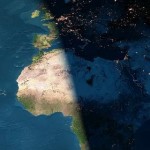
 My neighbour has a map of the world on the wall. You can see it from the street in front of his house. It has a backlight but that only illuminates half of the map. The transition from day to night is shaped like a sine wave most of the time. It actually is a physical world sunlight map. Of course, you can simulate this with a computer too. There even is an instance using Google maps.
As many roads lead to Rome multiple ways are possible to this simulation. One could model the sun, earth, maybe more and start ray tracing. This approach would include solar eclipses but is quite heavy by means of the load on the processor. Because of the number of calculations involved in ray tracing is quite high. The way I choose to describe fully in this article is one close to it. Using vectors pointing from a sphere (earth) to a point (sun) I map a Mercator projected map of the world on the sphere. The challenges included are the yearly orbit of earth around the sun and it’s 23.5° tilted 24 hour spin.
About a decade ago I made a similar program in highschool. I didn’t know vectors and trigonometry then as I do now. Back then I used to have the map of the world where for each longitude (the ones parallel to the equator) I calculated sunset and sunrise times for that longitude. This way I knew when to start painting night over the daylight map I had. This result was pretty accurate and an algorithm to determine those solar times is not hard to implement. This time I used another more advanced approach to the problem.
Space
First let us define a mathematical 3D space, with three axis:  (pointing from left to right),
  (pointing up) and
  (pointing into your monitor). Pointing directions are given to help your imagination. Axis point from small (negative infinite) to big (positive infinite), they intersect at
  .
.
Earth
Define a sphere on point  , with a radius of 1. This will be the earth. The funny thing is that for every point
 (x,y,z coordinate) on the earth, because the earth is centered around , automatically is the same a the vector pointing orthoganally away from the earth starting on that point. This comes in handy when we do calculations later on.

Sun
We don’t need the sun for this method. We only need the direction to it from the earth. So define a vector S which points in the direction of the sun from . To do this we must use sine and cosine. On time  the direction of the sun will be
  , which is a vector pointing to the right. On
  (hour) that should be pointing right
  . The same goes for 6 o’clock am and pm, being respectively
  and
and  . This gives us insight that the direction
  to the sun can be given as (
 should be scaled to a value from 0 to 1, so we need to divide by 24):

With this approach we actually make the sun rotate around the earth.
Tilted earth
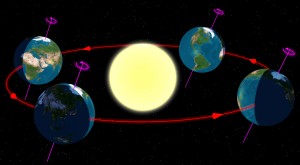
Tilted orbit of the spinning earth around the sun. The method discussed here turns it around as it models the sun orbitting the earth.
The above formula still is not complete. The axis around which the earth is spinning is not orthogonal to the plane defined by the orbit of the earth around the sun. It is tilted 23.5°. This is how we get the four seasons on earth of course. To model this a nice trick can be applied to d. We know that on or closely around June 21th the sun is right above the 23.5° latitude (Tropic of Cancer), the summer solstice. From here it takes a sine with a period of a year to go to -23.5° and back again. June 21th is the 172th day of the year. The standard cosine function has the form:

We can simply fill this out. The  must be 23.5,
  is
is  ,
,  is -172 and
  equals 0. If you define the observable tilt (because the real tilt will always be 23.5) and is the day of the year:

Now this observable tilt is the angle there is between what is the real direction to the sun and the already calculated direction d. To calculate the vector ( component, pointing up or down) which should be added to to get the real direction you can use tangens.

Then the real direction vector  is the addition of
  to :
to :

Calcultating illumination and mapping
Using the dot product (or scalar product or inner product) you can calculate the angle between two vectors. Or, if the vectors are both normalized (length = 1) it is the projection of the one vector onto the other. So if we calculate the dot product for every normal vector from the surface of the earth () with we should get some meaningful results.

If the  the sun is in another direction so is pointing to the night side of the earth. If
  that piece of earth recieves solar light.
We have a 2D map (Mercator projection) we need to map on the 3D sphere. We need to do this to determine which we need to calculate dot products for. To avoid confusion, lets call x and from the 2D map  and
and  . We can iterate for each and each for each and map it to a in 3D. To do this we need to determine phi (
 , logitude: )and theta (
 , latitude: ). In the iteration (
 is the height of the map and
  is the width of the map):
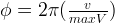
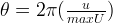
Now and map to as follows:
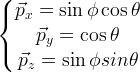
Now we can for each coordinate  on the map if it should be displayed as day or night.
Fun with shading
Because you know the angle the sunlight makes with the earth’s surface you can make add some shading by making it increasingly dark on the edges of the day. It the dot product of and is smaller than 0.1 ( ) the point is in dusk or dawn and you could mix day and night as a gradient to make the difference between them look more fluently. Another joke is the reflection of the sun: if the product is greater than, let’s say, 0.95 (
 ) the sun is approximately orthogonally above that coordinate an you could make it more white to have it look like the sun is reflecting in the map.
Demo and discussion
A demontration of this method is available at the edesign example site. There are a number of assumptions done and restrictions set while creating this demo.
Live sunlight map generated using the algorithm discussed in this article. Click the image to go to the example page where you can override current time.
- I assumed the solar rays are parallel. The distance from the sun to the earth is huge, but it is actually wrong to assume rays are parallel. They are only by approximation so it is good enough for this simulation.
- Because of this assumption, the night ’starts’ exactly at the half of the world in the shade while actually this is different. The sun is far bigger than the earth and therefor some rays should be able to reach the shadow half of the earth (near the limit depicted in the first image). By approximation I eliminated this too.
- Timing is not very accurate. As well as for the 24h clock as for the solstices rough estimates are used.
- A perfect sphere is taken as world. No fattening is modelled (polar radius should be smaller than equatorial radius).
- The ‘fun with shading’ should implement something to make land mass not reflect sunlight.


#1 by Uira Cocha - June 5th, 2009 at 22:18
Beautiful!
Thanks for your article and for making public the source code of its implementation in PHP
#2 by WorldSunRise - November 9th, 2009 at 22:42
Tried your script, but it doesn’t generate map picture. Not sure, but it might be because of “header already set” problem. t.i. do you have any tip? What web server you use?
#3 by Admin - January 23rd, 2010 at 12:47
These “headers already set” error is usually caused by some echo/print output or any content outside of your tags. You should locate the line causing the output of your script. Btw, I use Apache 2 httpd.
#4 by carlo - December 4th, 2010 at 18:49
Hi very nice work! Really!
I’m planning to use your script to generate a sunlight map for a project. Unfortunately I’m using a flat mercator projection (not projected on a sphere) and I can’t understand how to change the math to create a proper sunlight map. Could you give me some suggestions? Thanks!
#5 by Admin - December 7th, 2010 at 16:20
Thanks Carlo!
Actually, the image you see here is a mercator projection. The sphere I’m talking about is just a modelling trick to calculate illumination for the map. The part about ‘mapping’ is where I discuss the transformation from the sphere model to the 2D mercator map, the result. Contact me if you need more help.
#6 by AVEbrahimi - December 22nd, 2010 at 03:37
Thank you for vivid and professional documentation.
#7 by Dan - February 11th, 2011 at 22:40
Would it be possible to download your bigger images, too (i.e. day.png and night.png) instead of just the _live versions? Thanks!!!
#8 by Admin - February 27th, 2011 at 16:22
Hi Dan,
These images are made by NASA. I just mailed them to you. If you want the even bigger versions (originals) you should check at the nasa website. They’re free.
Regards,
Jurgen
#9 by Art Cady - May 29th, 2012 at 05:43
Great information, thanks…but I believe you have a small correction to make: you say longitude are the lines parallel to the equator, I believe you meant to say perpendicular to the equator?
#10 by João - June 28th, 2012 at 13:18
Nice code, very beautiful.
But I have a problem running your code : Undefined variable: rgb on lines 207 and 208 on map.php file. Where does this variable comes from?
Thanks
#11 by Joost de Folter - December 29th, 2012 at 03:55
Excellent article thank you. This seems to be the only page explaining it, and in a very clear way.
However, please note there are several inconsistencies between mentioned equations and your source code. Only by looking at the JS code was I able to reproduce the correct behavior.
Thanks again!
#12 by Rob Smart - June 4th, 2013 at 18:03
Is this line correct?
To do this we must use sine and cosine. On time the direction of the sun will be , which is a vector pointing to the right. On (hour) that should be pointing right .
It seems to be pointing right at both times???
#13 by Christopher Stevens - June 18th, 2014 at 00:55
I truly appropriate you posting this. I’m attempting to generate a very stylized world map with a cloud overlay and now lighting. Your great description from 2009 is helping five years later!!
I look forward to playing with the PHP code linked, which should speed things up significantly.
Thanks a ton!
Chris
#14 by Metin - October 27th, 2014 at 10:07
Hello. Thanks for sharing. But where i can download this script? I can see any download link.
thanks inadvance
#15 by Metin - October 27th, 2014 at 17:05
thanks. i found codes on live example page. bug index.php gives render.png not found error.
where is render.png?
thanks
#16 by Admin - November 6th, 2014 at 17:38
Please have a look at the example. On the bottom left you’ll find links to the sources.
#17 by Ozzyoshi - August 19th, 2015 at 15:48
Why do you need the sphere class? The earth object is not used
#18 by Admin - September 7th, 2015 at 16:48
Because I need to calculate the angle between the direction of the sunlight the surface of the earth.
#19 by cprior - October 10th, 2017 at 19:49
Hi, many thanks for the explanation and code!
Just about to finish porting this to a verbatim version in Golang. While debugging it seems that
$dayOfYear = date(‘z’, $mktime);
should be
$dayOfYear = date(‘z’, $mktime) + 1;
#20 by tarek - May 22nd, 2018 at 14:16
we cannot generate equation from it so we do not need any iteration and lot of time for calculation.
if we can generate a relation between longitude and latitude with the plane parallel to the direction of the sun and intersected with earth ?
#21 by Andrés Felipe Torres - June 27th, 2018 at 01:56
Hi,
Is there a way to include the moon shadow when on an eclipse? I would like to deduce an algorithm to generate an image like this:
https://www.timeanddate.com/scripts/sunmap.php?iso=20170821T1800
#22 by Beck - July 25th, 2018 at 18:36
Hello, thank you for the awesome work! I am implementing exactly the same day light map but using Javascript. How to overlay night image so that it will just show under the night time?
Thank you
#23 by BennyBoom - November 11th, 2018 at 19:56
Hello!
Nice work, I try to generate a mask in black&white according night/day , do you know how I can do that with your code?
Thanks for your help
Regards